[ INDIVIDUAL COMPONENT // MOTHERBOARDS ]
MSI Z170A GAMING M7
Intel Z170 / LGA1151 ATX gaming board with four DDR4 DIMMs, three PCIe x16-length slots and dual M.2. This is a dedicated model record; revision, CPU and firmware qualifications are documented below.
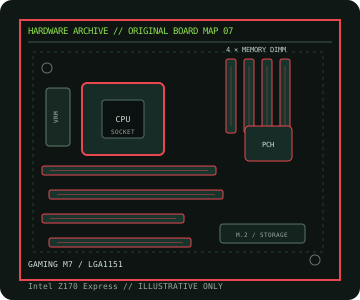
IDENTIFICATION: Verify the printed model and PCB revision against manufacturer support files before selecting a processor, memory kit, firmware image or replacement board. Similar names can describe electrically different products.
Specifications
| Catalog subcategory | Enthusiast Intel platforms |
|---|---|
| Exact board / revision | Z170A GAMING M7 |
| Platform / era | Intel Skylake / Kaby Lake enthusiast desktop platform, 2015 |
| CPU socket / compatibility | LGA1151; Intel 6th-generation Core, Pentium and Celeron processors; selected 7th-generation processors require a compatible BIOS and MSI CPU-list entry. |
| Chipset | Intel Z170 Express |
| Memory | Four dual-channel DDR4 DIMM sockets, up to 64 GB non-ECC unbuffered memory; XMP and elevated rates are CPU/BIOS/module dependent. |
| Expansion slots | Three PCIe 3.0 x16-length slots (x16, x8/x8 or x8/x8/x4 lane modes) and four PCIe 3.0 x1 slots. |
| Form factor | ATX, approximately 305 × 244 mm; confirm case/standoff support and PCB dimensions in the manufacturer manual. |
| Storage / I/O | Six SATA 6 Gb/s ports, two SATA Express connectors and two M.2 sockets; port availability and lane sharing depend on installed M.2/SATA devices. |
| Firmware and validation | Use only firmware for this exact model and revision. Confirm the selected CPU in the manufacturer CPU support table and satisfy its stated minimum BIOS; consult the board manual and memory QVL for DIMM placement, shared lanes and port limitations. |
Compatibility and revision notes
ATX (305 × 244 mm). Verify exact CPU support and BIOS before installing 7th-generation processors. This is a DDR4 board and cannot accept DDR3. Refer to MSI’s board manual for the two M.2 sockets’ supported lengths/protocols, SATA lane sharing, memory order and slot configuration.
Physical socket fit, chipset family or a matching module notch does not independently guarantee compatibility. Confirm the exact CPU, BIOS release, memory type/capacity, slot wiring, device protocol and board dimensions in the manufacturer documentation before building or servicing a system.
Preservation and repair
Record the full PCB model, revision and BIOS identifier before maintenance. Inspect socket contacts, DIMM/PCIe connectors, VRM area and electrolytic components; document any corrosion, rework or missing hardware. Use ESD-safe handling and follow the manual’s clear-CMOS procedure.
For an archive record, photograph labels and connector condition before cleaning. Do not cross-flash firmware from a similar model or revision, and never power a board with loose conductive hardware beneath it.
Manufacturer sources
- MSI — Z170A GAMING M7 specificationsOfficial manufacturer product/manual documentation for this exact model.
- MSI — Z170A GAMING M7 manuals, BIOS and supportOfficial manufacturer CPU/firmware/support reference; confirm the board marking and revision.
Specifications and compatibility can vary with PCB revision, regional SKU, processor stepping and BIOS. Consult the linked manufacturer support material for the exact board.