[ FLOPPY EMULATORS // IDENTIFIED HARDWARE ]
HxC SD MAX Floppy Emulator
A model-specific record for a physical floppy-drive emulator. It distinguishes the emulator hardware, removable media and host-facing drive signals; firmware support alone does not establish compatibility with a particular machine.
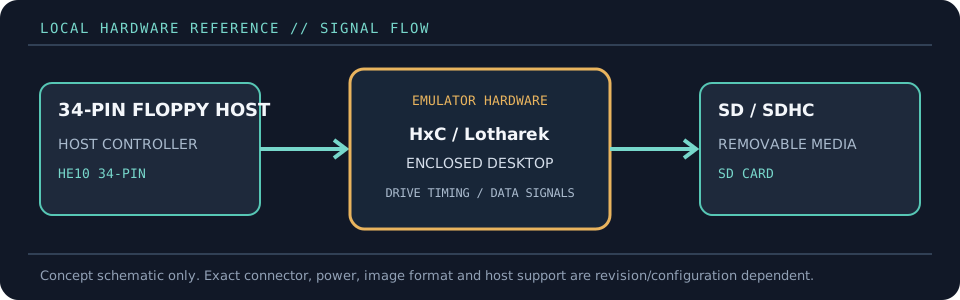
MODEL IDENTIFICATION: PRODUCT RECORD: HxC SD MAX Floppy Emulator. Compatibility is conditional on the actual host’s connector, controller, signal conventions, drive geometry, firmware and media configuration; do not infer fit from connector count or nominal drive size alone.
Recorded specifications
| Cataloged part | HxC SD MAX Floppy Emulator |
|---|---|
| Manufacturer / project | HxC / Lotharek |
| Product family | Enclosed SD-card floppy emulator with integrated LCD and controls |
| Drive bay / physical fit | Desktop/enclosed unit; it is not a bare 3.5-inch mechanism. Position near the host and connect the host’s floppy cable and suitable power. |
| Host interface / power | HE10 34-pin floppy connector; supports Shugart and PC-compatible modes. The MAX enclosure provides LCD, selection buttons, status LEDs and SD-card access. |
| Removable media / image format | SD/SDHC card with FAT32 image storage; HFE and the supported HxC image families are managed using HxC software and firmware. |
| Host compatibility | Documented for many 34-pin computers and instruments, including Amiga, Atari ST, Amstrad CPC, MSX, ZX Spectrum, PC-compatible systems, samplers and CNC equipment. Check each host configuration rather than treating the list as plug-and-play assurance. |
| Variants and identification | Cataloged as the HxC SD MAX enclosed LCD model, distinct from the existing HxC Slim SD entry and from the standard enclosed Rev F listing. Verify the current board/firmware and case variant on the unit. |
Compatibility and handling
- MAX refers to the enclosed unit sold as HxC SD MAX; case color is not a separate emulator model.
- A single emulator can emulate two drive units according to HxC product documentation; host wiring/configuration is necessary, and not every host uses both.
- Image-format breadth is firmware-dependent. Keep the host configuration file and any converted images with the archive record.
Before installation, compare the emulator’s exact revision and interface against the host service documentation. Confirm connector keying and pin one, power voltage/polarity, drive select, motor/disk-change signals, expected density and image geometry. Preserve a read-only copy of original disk images and configuration files before experimenting.
Model notes
Cataloged as the HxC SD MAX enclosed LCD model, distinct from the existing HxC Slim SD entry and from the standard enclosed Rev F listing. Verify the current board/firmware and case variant on the unit.
SD/SDHC card with FAT32 image storage; HFE and the supported HxC image families are managed using HxC software and firmware.
Sources & further reading
- AMIGAstore — HxC SD MAX product pageModel listing describing the MAX enclosure, LCD, controls and supported interfaces.
- HxC2001 — SDCard HxC Floppy Emulator user manualPrimary HxC SD operation and supported-media documentation.
- HxC2001 — supported machines and compatibility listMaintainer-published host compatibility list and revision cautions.
Manufacturer statements describe product capability, not guaranteed operation on every revision of the named host. Confirm current manual, firmware and wiring before installation.